How To: Wine Mac AirDC++ Client

DC++ is the peer-to-peer file sharing application - which is dying a slow death - especially for Mac X. In our article Best DC++ Clients for Mac we detailed compatible DC++ clients that were Mac only. Unfortunately, all those clients no longer receive active support and therefore are trash. Most DC++ hubs today use SSL and therefore force clients to support the latest versions of OpenSSL. The most recent version of the Mac DC++ clients don’t support the latest version – as of this article.
As an example, the latest version of EiskaltDC++ for Mac X won’t enforce the latest Open SSL standards many hubs are running.
Fail: SSL Error: error:00000001:lib(0):func(0):reason(1) (0, 1)...

Today, many Mac users emulate Windows and their favorite programs. I have some good news, you can emulate using Wine and one of the last surviving DC++ clients available online - AirDC++.
Here is how to get AirDC++ working in Mac X 10.11 El Captain
1. Download and install the latest version of Wine
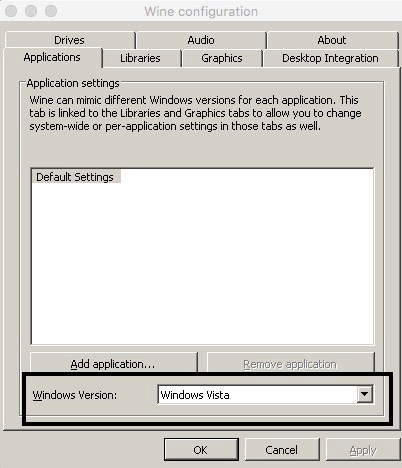
2. In order for the latest version of AirDC++ to work in Wine, you need to change the emulation of Wine to use Windows. Go to Wine Icon in Menu Bar -> Configuration -> Applications Tab. Choose Windows Version: Windows Vista
3. Download and install the latest version of AirDC++. We are using AirDC++ 32-Bit Portable
4. When you first launch AirDC++, you will get prompted with first time setup. Click through the last step and you can safely hit cancel. This will launch you right into the program.
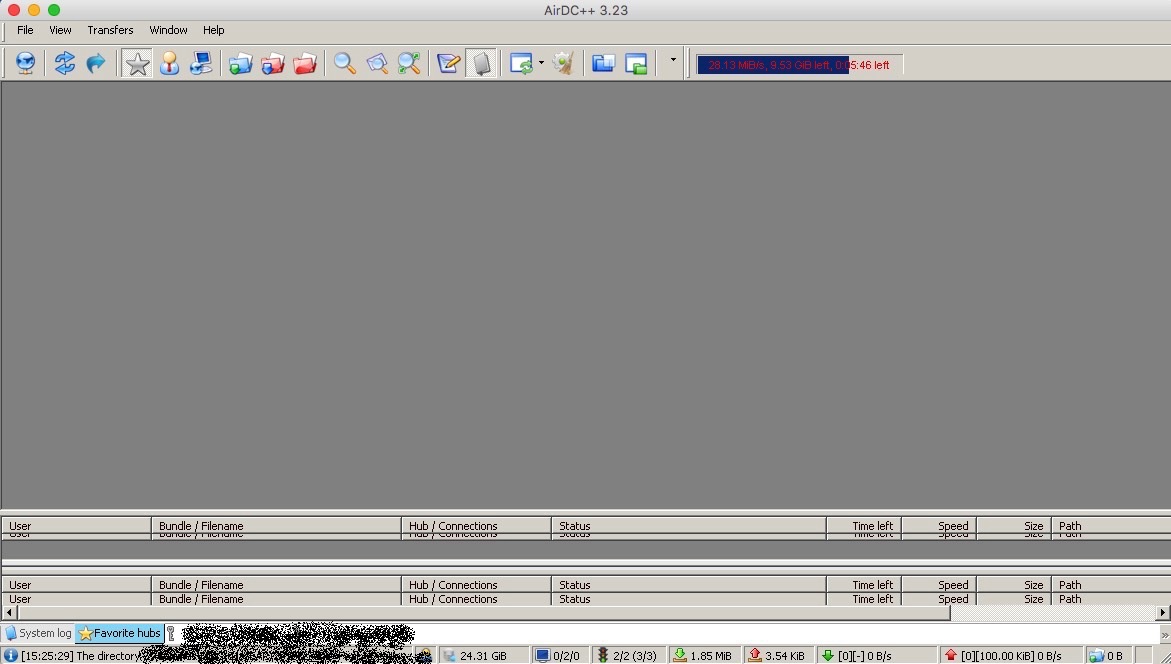
Enjoy using AirDC++ in Mac X!