Fix: Navigation to the Webpage Was Canceled – Internet Explorer

In Internet Explorer, you may receive an error browsing a webpage. The error falsely states that the navigation to the webpage was canceled when you did not cancel the request to begin with.
Navigation to the webpage was canceled
What you can try:
Retype the address.
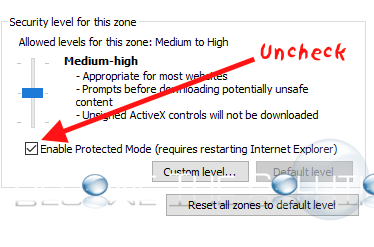
This error happens when Internet Explorer protected mode is enabled for certain websites in Trusted Sites.
Note: If you receive this message without browsing a webpage, in other words you open up Internet Explorer and get” Navigation to the webpage was canceled” it is highly likely Internet Explorer is infected with malware or you have a virus. Use ant anti-virus program immediately.
- Check to see if Enabled Protected Mode is enabled in Internet Explorer. In Internet Explorer, go to Tools -> Internet Options -> Security and uncheck enable protected mode.
- Attempt to reset Internet Explorer.
- Update to the latest version of Internet Explorer here.
- Finally, try another browser (Google Chrome, Mozilla Firefox) and browse the page that way.