Fix: Lync Window Always on Top

Is Microsoft Lync suddenly staying on top of all other windows you have open on your desktop? Are you always having to minimize the Lync window to get it out of the way? Luckily, there is an easy solution to have Lync behave normally every time you click another window in your desktop area.
1. Go to the Lync Menu -> Tools -> uncheck Always on Top
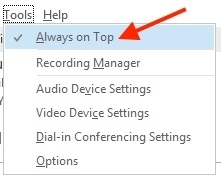
The Lync window will no longer appear in the front all the time. If you find this happening still, Microsoft has documented this is a known issue when there are multiple installations of Lync installed in Windows.