• Home
  • SEPERATOR
  • Search

How To: Export Bookmarks Google Chrome Mac

How To: Export Bookmarks Google Chrome Mac

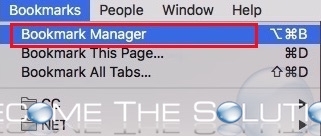
1. In Google Chrome, go to Bookmarks -> Bookmarks Manager

Google chrome mac bookmarks manager


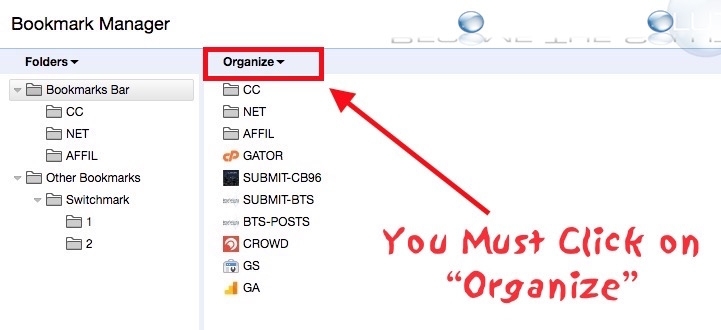
2. Click on the Organize button drop down.

Google chrome mac bookmarks organize


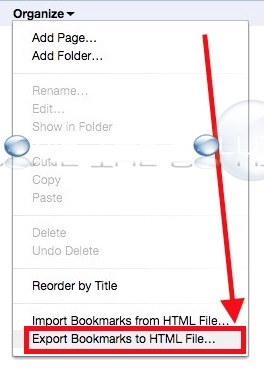
3. Select Export Bookmarks to HTML File…

Google chrome mac export bookmarks html file


Done!

Tags:
Mac Google

Related Posts

Google Search Console: Couldn’t fetch | Sitemap could not be read. Why?

Google

How To Download all your YouTube Channel Videos (Bulk Download)

Google

Message blocked (Message rejected) – Gmail

Google

Google AdSense and Migrating HTTP to HTTPS Sites – Revenue Impact?

Google

Easy: GMAIL Disassociate Email Account

Google

Why: We're sorry but your Gmail account is temporarily unavailable.

Google


Shop on Amazon for Great Deals on Mac & Apple Products
A Chicago Company & Blog. Deeply Rooted in Chicago.
All rights reserved. Become The Solution, LLC
About | Privacy Policy
All trademarks, copyright, and articles of this website are property of original owners.
Note: becomethesolution.com is paid commissions from affiliate links and Ads shared in articles.