Home
SEPERATOR
Search
How to Enable Excel Add-Ins
1. Open
Excel
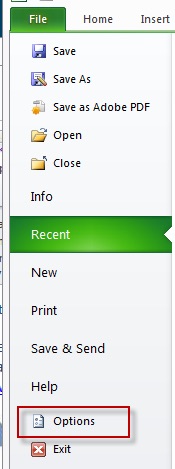
2. Go to
File -> Options
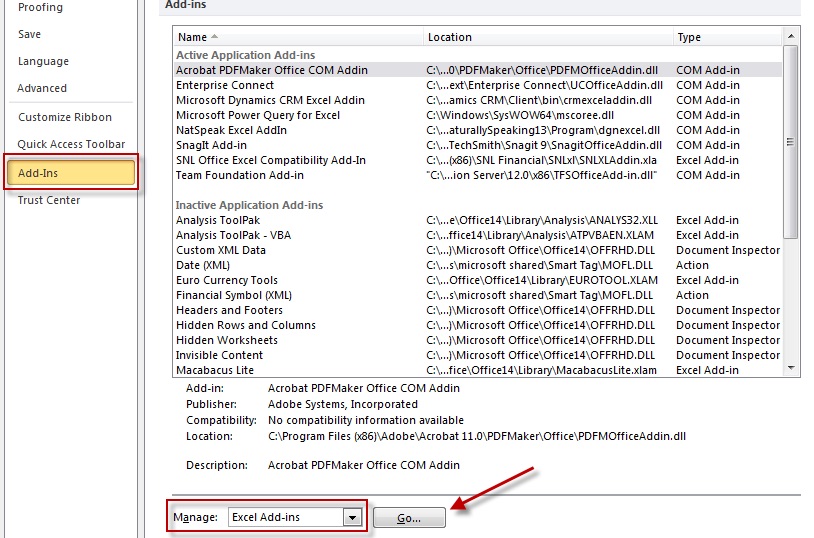
3. Select
Add-Ins
and make sure
Manage Excel Add-ins
is selected. Hit
Go.
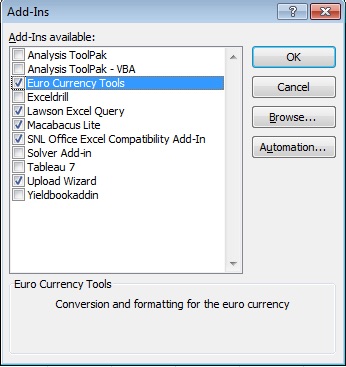
4. You can select which Add-Ins to use in Excel.
5. Click
Ok
Tags:
Windows
Related Posts
How to Fix: “An error occurred while moving your channel” (YouTube Brand Account)
Windows
Fix: Maximum Display Brightness + Windows Boot Camp
Windows
Can’t Play – 0xc00d36f2 Windows Media Player
Windows
Fix: Sorry, you need to sign out of Teams and sign in again before you can schedule your meeting.
Windows
Fix: Acrobat Distiller Unable to Create the Temporary Folder Error: 183
Windows
Fix: Microsoft Access has detected that this database is in an inconsistent state and will attempt to recover the database.
Windows
Shop on Amazon for Great Deals on Mac & Apple Products