Fix: Avaya One-X Communicator is Unable to Connect to the Server

If you launch Avaya One-X Communicator, you may receive the following error message about the application not able to be configured.
Login Error
Avaya One-X Communicator is unable to connect to the server. Make sure that you have entered the correct IP address or domain name information. Try to log in again. If you are still unable to log in, there is a problem with your network (for example, the network is “down” or your LAN cable is disconnected or defective). Contact your system administrator.
- Click Ok.
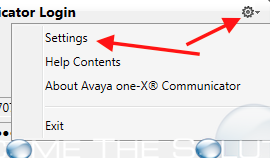
- Click the gear in the top right corner. Then click Settings.
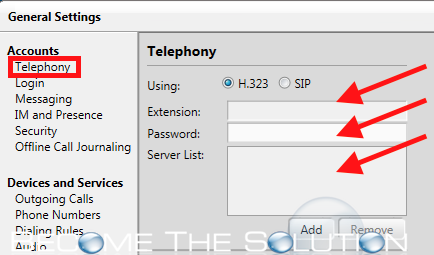
- Click on Telephony. Now, you must add an extension, password, and server. If you do not know this information, contact your systems administrator.