Fix: Akeeba Database Restoration Error: COLLATE=utf8mb4_unicode_ci

Using the latest version of Akeeba Backup, you may receive the following error while trying to restore your database:
Database restorationAn error occurred while restoring the database. The error message can be found below. Click on the × button at the top right of this dialog message to close it and return to the database restoration page.
Database error processing line 5
Database server error reply:
ErrNo #0
SQL=CREATE TABLE `ttcmy_akeeba_common` ( `key` varchar(255) COLLATE utf8mb4_unicode_ci NOT NULL, `value` longtext COLLATE utf8mb4_unicode_ci NOT NULL, PRIMARY KEY (`key`) ) ENGINE=InnoDB DEFAULT CHARSET=utf8mb4 COLLATE=utf8mb4_unicode_ci
Raw query text:
CREATE TABLE `#__akeeba_common` ( `key` varchar(255) COLLATE utf8mb4_unicode_ci NOT NULL, `value` longtext COLLATE utf8mb4_unicode_ci NOT NULL, PRIMARY KEY (`key`) ) ENGINE=InnoDB DEFAULT CHARSET=utf8mb4 COLLATE=utf8mb4_unicode_ci
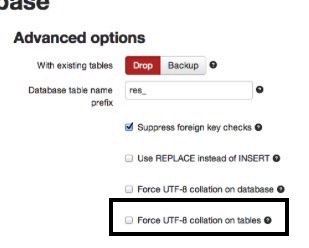
This is caused by an incompatibility between the old and new database servers. To get around, click the advanced options and select Force UTF-8 collation on tables. The restore will complete successfully.